01Haemil Shot

03Haemil Shot
Straight to the clipboard.
Your screenshot goes straight to the clipboard, with no window in the way. Just paste it. To mark it up, click the notification and the editor opens.
- ⌃⌥SCapture area
- ⌃⌥⇧SCapture full screen
- ⌃⌥EEdit last capture
02Setup
Three steps and you're done.
- 01
Download and move
Open HaemilShot.dmg, drag Haemil Shot to Applications and open it.
- 02
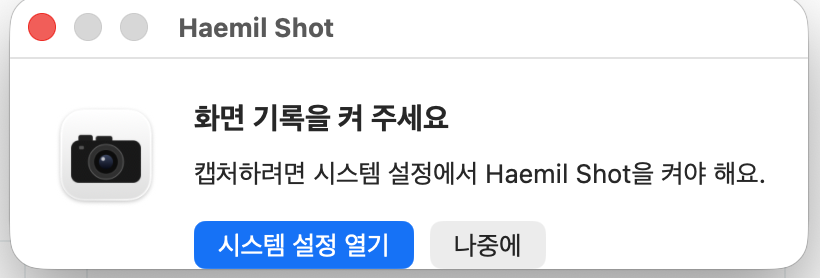
Allow Screen Recording
The first time, it needs Screen Recording permission. In the window below, click 시스템 설정 열기 (Open System Settings), then turn on Haemil Shot in Privacy & Security › Screen & System Audio Recording. If asked to reopen the app, reopen it.
- 03
Then it just runs
Opened from Applications, it adds itself to Login Items, so it starts with your Mac. To stop that, turn it off in System Settings › General › Login Items.
03Editor
Click the notification and the editor opens.
Press 1 to 9 to pick a tool. Enter puts the edited image on the clipboard and closes the editor.
- 01
Nine tools
Pen, highlighter, box, ellipse, line, arrow, mosaic, crop and eraser. Pick red, yellow, green, blue, black or white.
- 02
Undo and auto-save
Undo and redo work. Every edit saves itself, so you can reopen a capture later and keep editing.
- 03
Last 30 captures
The list on the right of the editor holds your 30 most recent captures. Click one to open it, or × to delete it. Deleted captures go to the Trash.
04Privacy
Captures stay on your Mac.
- 01
Saved only on your Mac
Captures are saved only in ~/Library/Caches/BendShot. It keeps the 30 most recent. Past 30, the oldest capture is deleted without going to the Trash.
- 02
No network access
The app never connects to the internet and sends nothing out.
- 03
33 rules, proven
33 editor rules, such as "Enter always copies", are proven at build time. If a proof fails, the app does not build.
MIT license. The editor is written in the Bend language; the app includes the Bend runtime (Apache 2.0).